Timeline: October 2023 – August 2025
Team: 1 UX Designer (me), Product Managers, Front-end and Back-end Engineers
Tools: Figma, FigJam, Lucidchart, Slack, JIRA, Confluence
NGINX, owned by F5 Inc., is the world's most popular web server software, powering around 40% of the top websites globally.
NGINX One SaaS Console is a cloud-based management platform designed to simplify the deployment, monitoring, security, and scaling of NGINX instances across any environment: on-premise, cloud, or containerised. As the sole UX designer for NGINX, I owned the end-to-end design process of the entire product and collaborated with product management and engineering to take it from conception to launch and beyond.
Prior to NGINX One, NGINX had a UI-based product suite called NGINX Management Suite containing four modules: NGINX Instance Manager, API Connectivity Manager, App Delivery Manager, and App & API Security. These products were designed primarily for on-premise deployments and had limitations in terms of scalability, ease of use, and integration with modern cloud environments. Three of the four modules weren't gaining traction, and the one that was, Instance Manager, was too limited to meet what customers actually needed.
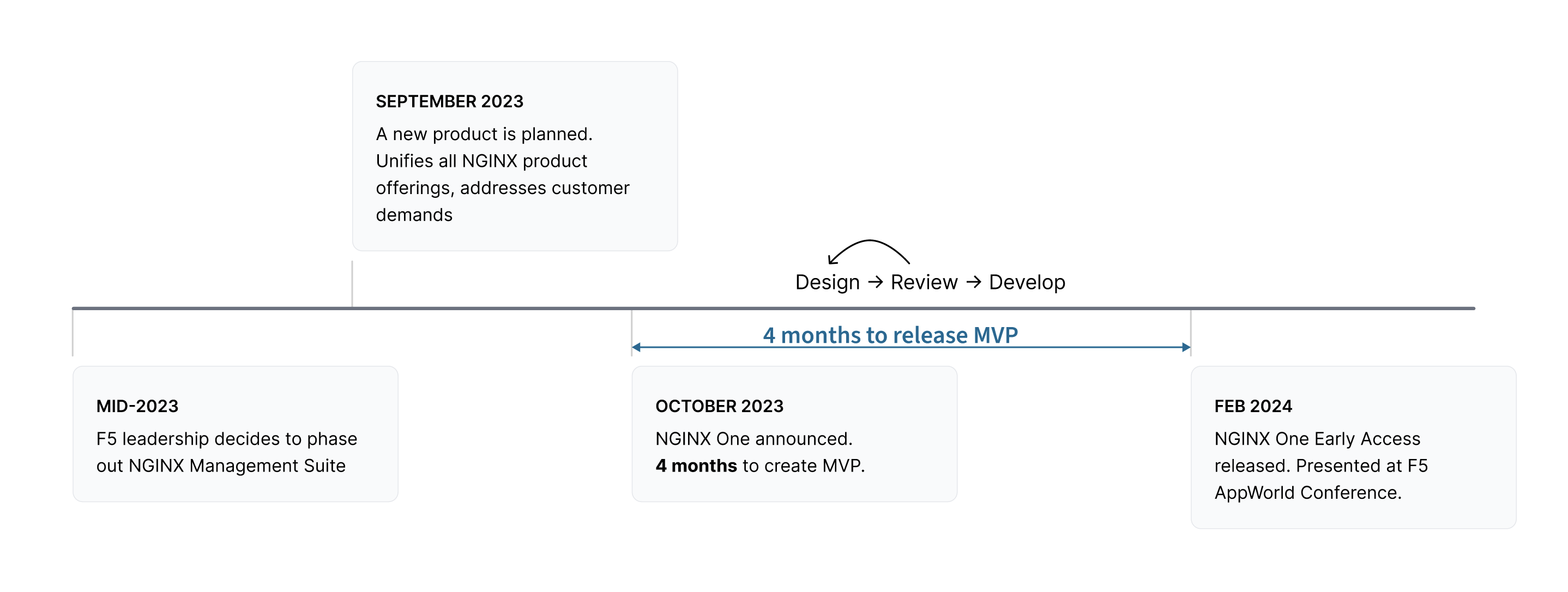
In mid-2023, F5 leadership made the call: phase out NGINX Management Suite and build a single, unified SaaS product from the ground up. The product team had four months, from October 2023 to February 2024, to design, build, and ship an MVP, to be demonstrated at the F5 AppWorld conference as an early-access product for existing customers.
I joined F5 in January 2023 as one of two designers on the NGINX team. Two months later, my colleague left and design responsibility for every NGINX product fell to me alone. With engineering teams waiting on designs and a hard conference deadline approaching, I had to move fast while ensuring the new product would solve the problems that had frustrated customers in the old one.
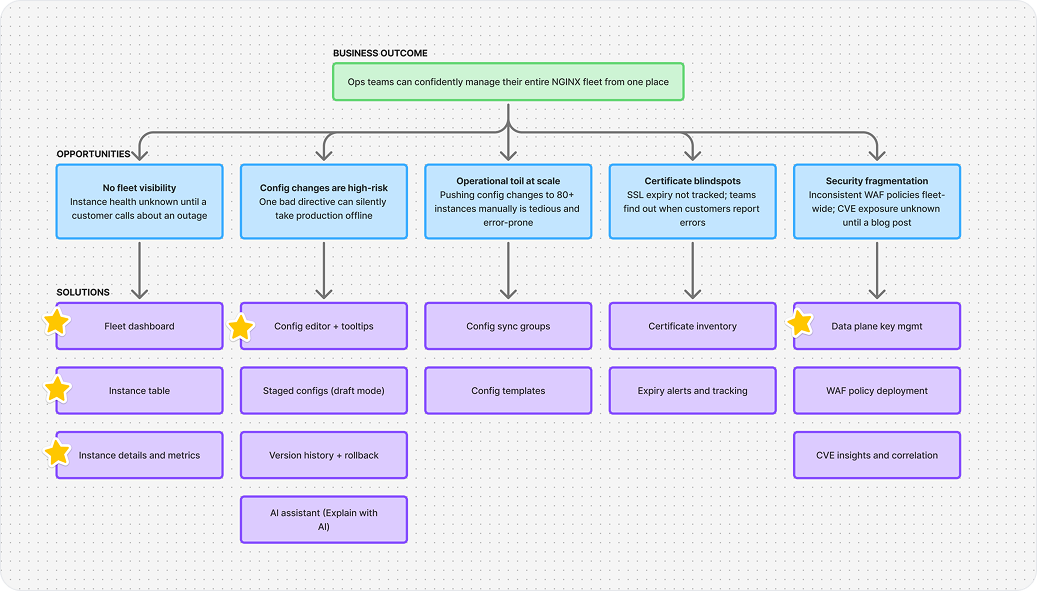
At each design stage, I worked with PMs and customer success engineers to surface what users were actually struggling with. Four themes emerged consistently:
No centralised visibility
There was no single place to view the health, status, and performance of an entire NGINX fleet. Teams pieced together a picture from disconnected tools and logs, or found out about problems from customers.
Configuration risk
Editing raw NGINX configuration files was intimidating and high-risk. A single syntax error could silently break a deployment or take a production instance offline, so many users avoided editing at all.
Operational toil
Critical but repetitive tasks like certificate renewals, pushing config changes to dozens of instances, applying security policies consistently were manual, time-consuming, and error-prone.
Security blind spots
SSL/TLS expiry was tracked manually, or not at all. WAF policies were fragmented across deployments with no audit trail. Teams had no visibility into which instances were exposed to known CVEs until it was too late.
How might we simplify the management and monitoring of NGINX instances, improve understanding of NGINX configurations, and reduce operational complexity for platform and security operations teams?
As the sole designer, I owned every aspect of the product's UX. I had to move fast, but also had to ensure we were solving the right problems.
I took a user-centred approach to design, grounding every decision in real user feedback and data. My most valuable insights were from product managers and customer success engineers, since they had direct relationships with customers and could informally validate designs before any formal study. At every stage, I grounded decisions in what users were actually reporting, not assumptions.
By the end of the project, design had become the central development artifact for the team, design mockups drove engineering conversations, not the other way around.
Establishing design as source of truth
Cohesive UX designs as the primary reference for every feature, referred to by executives, architects, engineers, and PMs.
Scaling myself
Proactively sought technical expertise from PMs and engineers along with UX designers working on other products.
Protecting product focus
Developed a strong prioritization framework for managing a high volume of incoming requests, and communicated expectations realistically.
Adapting the design system
Advocated for justified deviations from the F5 Distributed Cloud design system when use cases demanded purpose-built patterns.
For each feature, I followed a consistent process:
Define scope
Collaborate with PMs and engineers on requirements and constraints
Surface pain points
Gather prior product feedback via customer success engineers
User flows & wireframes
Map the experience end-to-end before moving to high-fidelity
High-fidelity mockups
Design production-quality screens in Figma
Iterate
Refine with PM, engineering, and CS engineers, who looped in customers when needed
Implement & verify
Partner closely with engineers during and after build to maintain fidelity
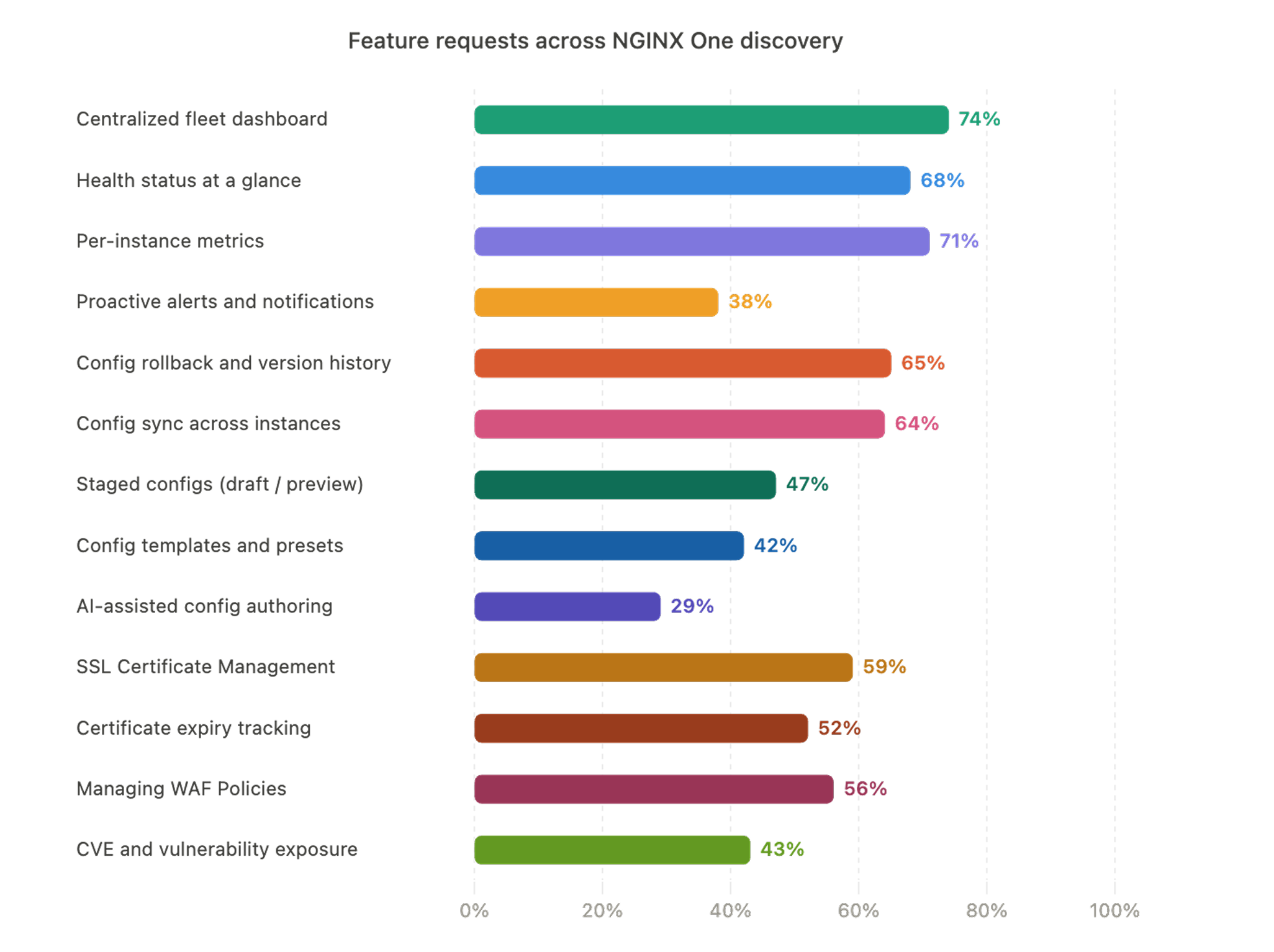
Based on customer feedback and feature requests, organic feedback from social media and workshops to prioritize features based on impact and feasibility, the MVP was scoped around one core question: "Can ops teams monitor and manage their NGINX instance fleet from one place?" We focused exclusively on that, and shipped on time.
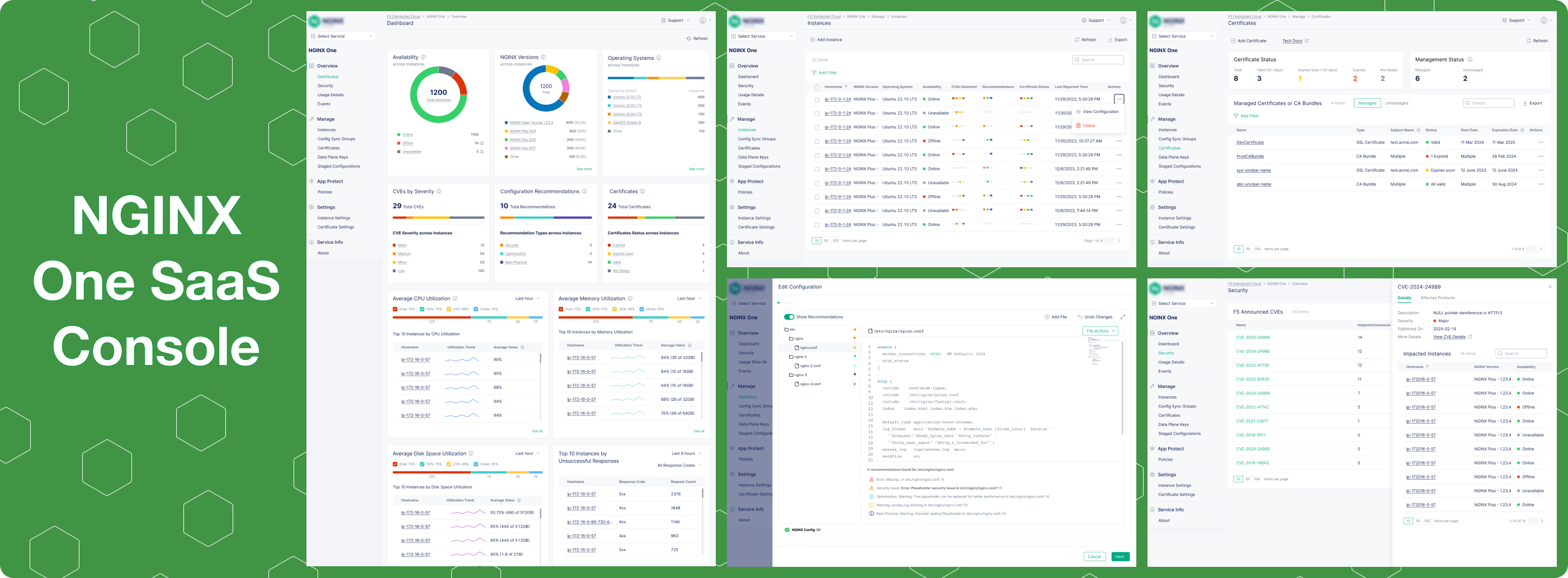
Fleet Dashboard
At-a-glance view of fleet performance: offline instances, expiring certificates, CVE exposure, and resource utilisation, all from one screen.
Instance Table & Details
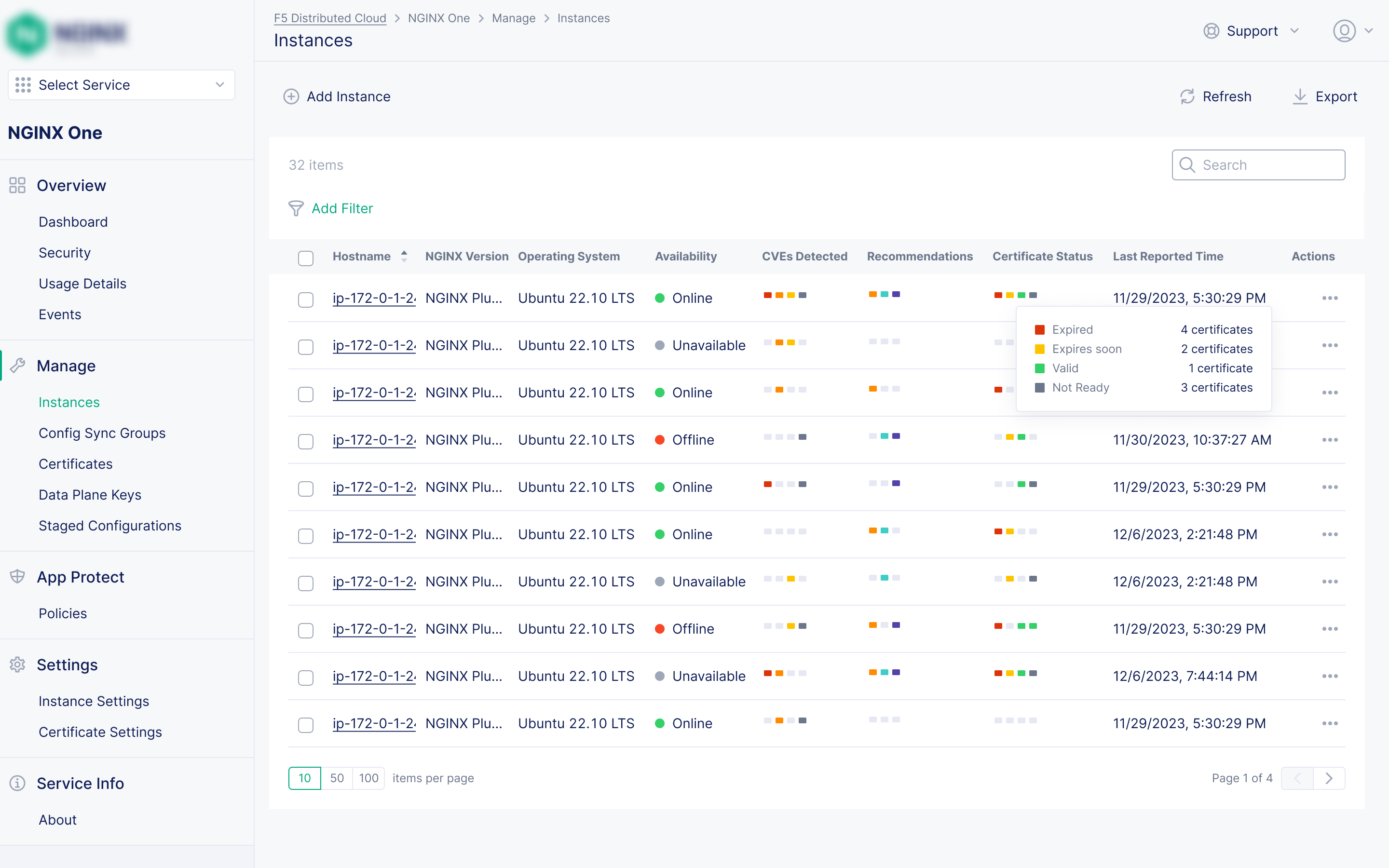
A richer instance list with significantly more per-instance data than any prior product, plus a details page with monitoring metrics and visualisations.
Configuration Editor
An editor with inline recommendations for best practices, security issues, and optimisations, plus contextual tooltip hints for every NGINX directive.
Data Plane Key Management
Secure token management ensuring only authorised NGINX instances can connect to and communicate with NGINX One.
Post-MVP, I designed six major features, each traced directly to a specific customer pain point.
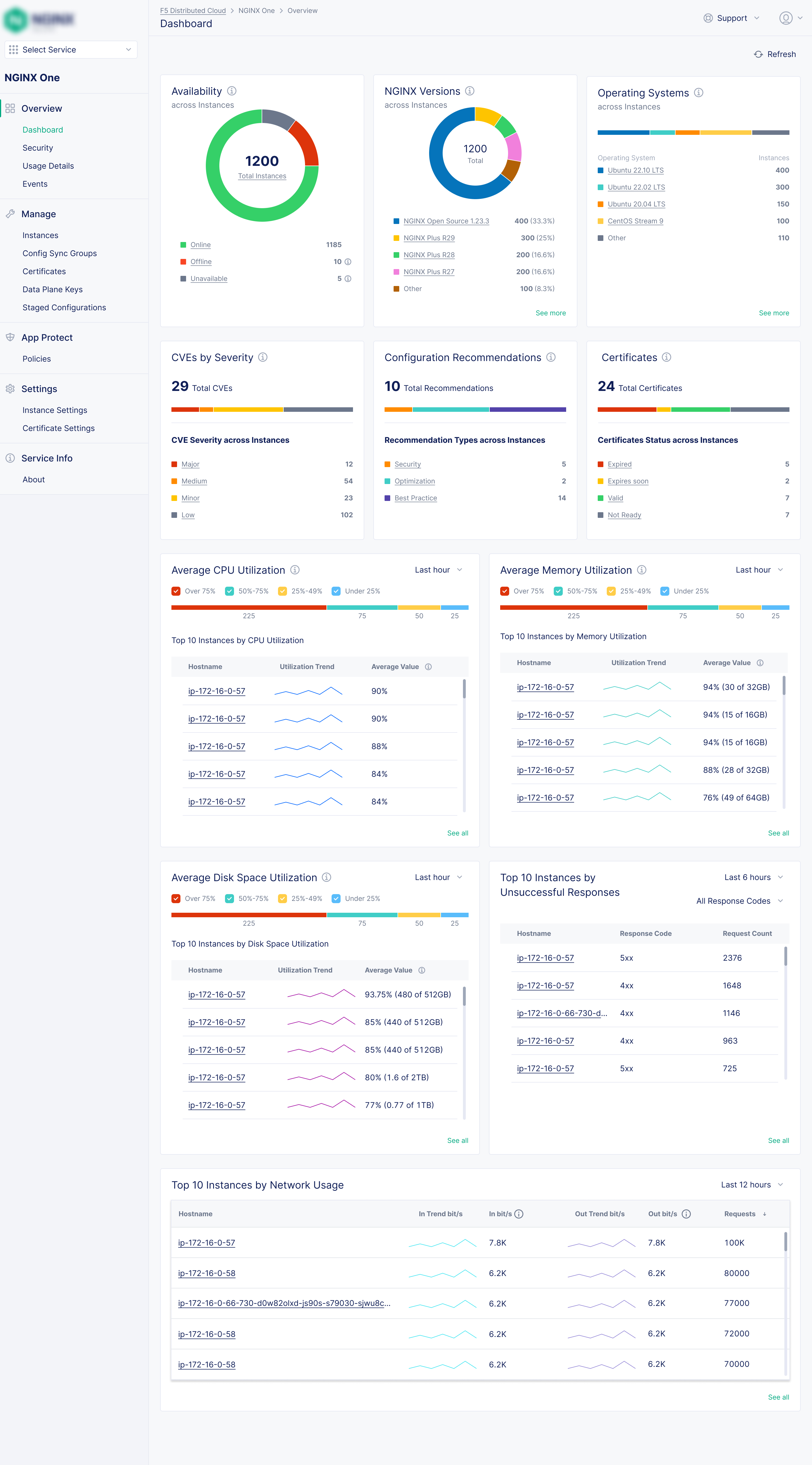
Unified Fleet Monitoring Dashboard
"I have no idea which instances are offline until a customer calls us."
Problem: There was no single place to see the health and performance of an entire NGINX fleet. Teams were piecing together a picture from disconnected tools, often discovering problems only after they'd impacted customers.
Solution: A centralised dashboard that surfaced what mattered most, all at a glance. The design challenge was balancing density with clarity. Ops teams need a lot of data, but not noise. I designed it so a user could dig in to every alert to reach to what was causing it.
Fleet status at-a-glance
Offline, degraded, and healthy instance counts with direct drill-down to the affected instances.
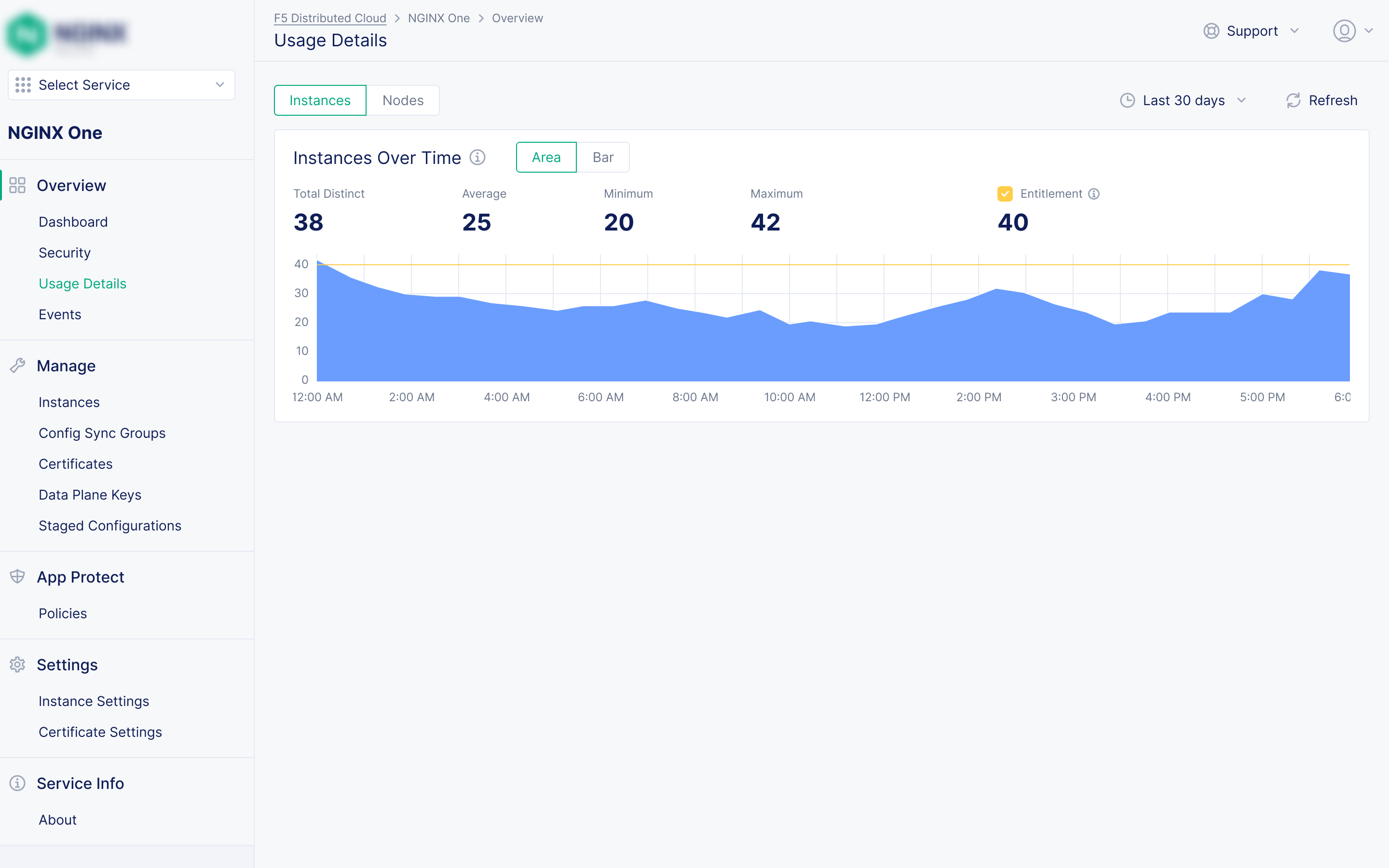
Resource & network metrics
CPU, memory, and network traffic visualisations across every instance in the fleet, with individual instance details for deeper diagnostics.
Certificate expiry alerts
Proactive warnings before certificates expire, surfaced on the main dashboard so they can't be missed.
CVE exposure summary
How many instances are affected by known vulnerabilities, surfaced without manual checking. Always up-to-date.
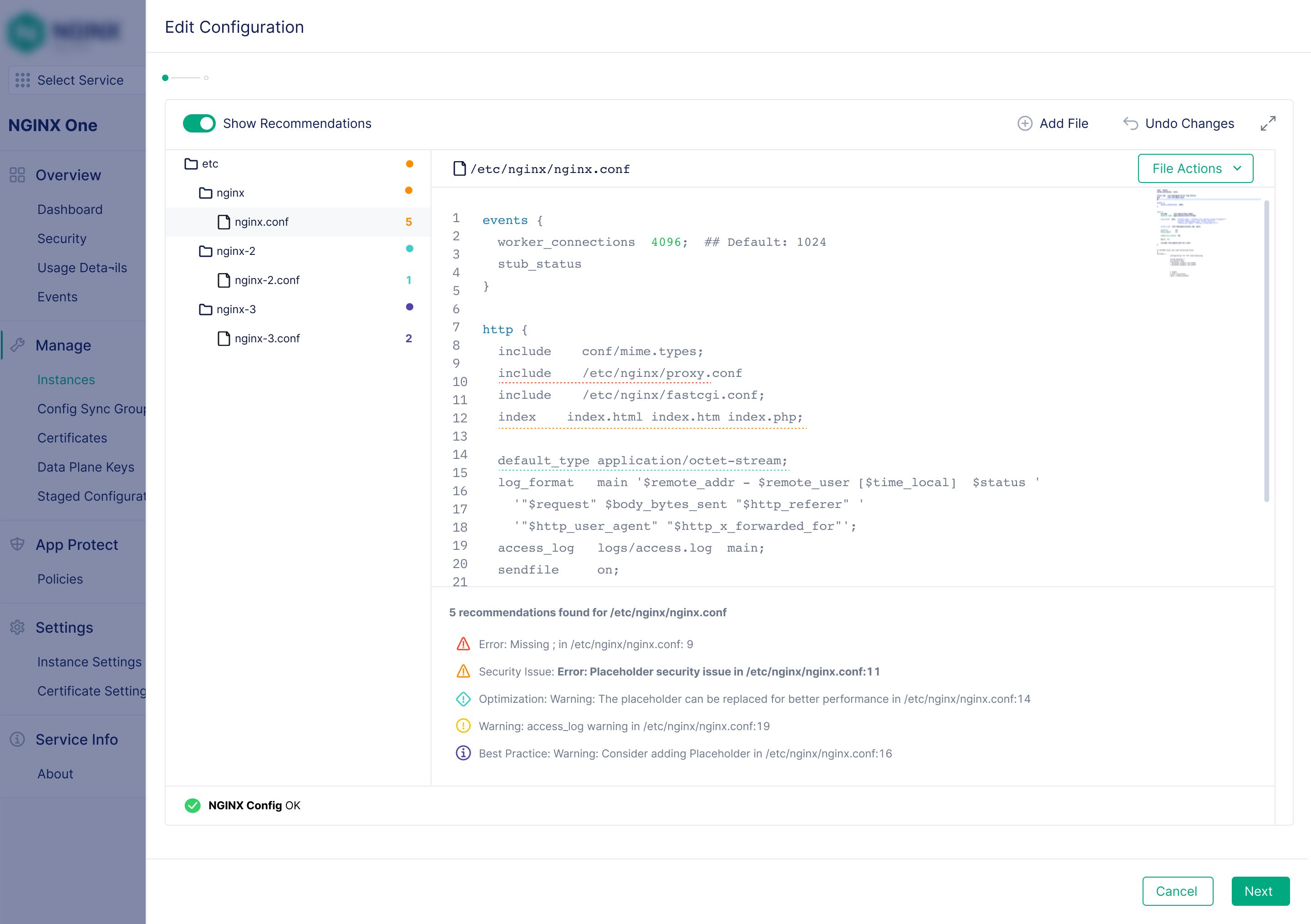
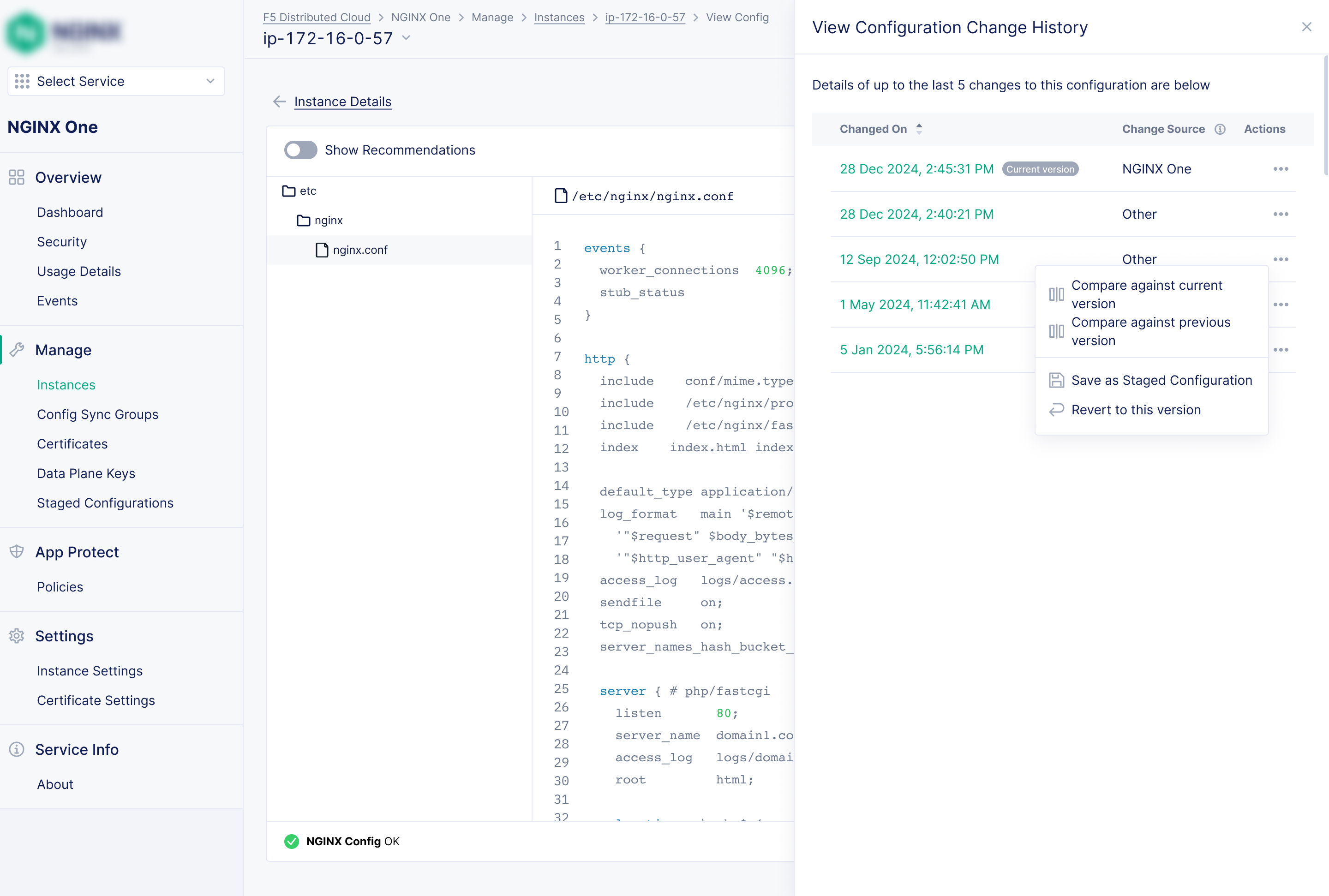
AI-Assisted Configuration Management
Problem: Editing raw NGINX configuration files was intimidating and high-risk. NGINX's syntax is powerful but a single error could silently break a deployment. Many users avoided editing configurations, which meant they were missing out on the platform's full power.
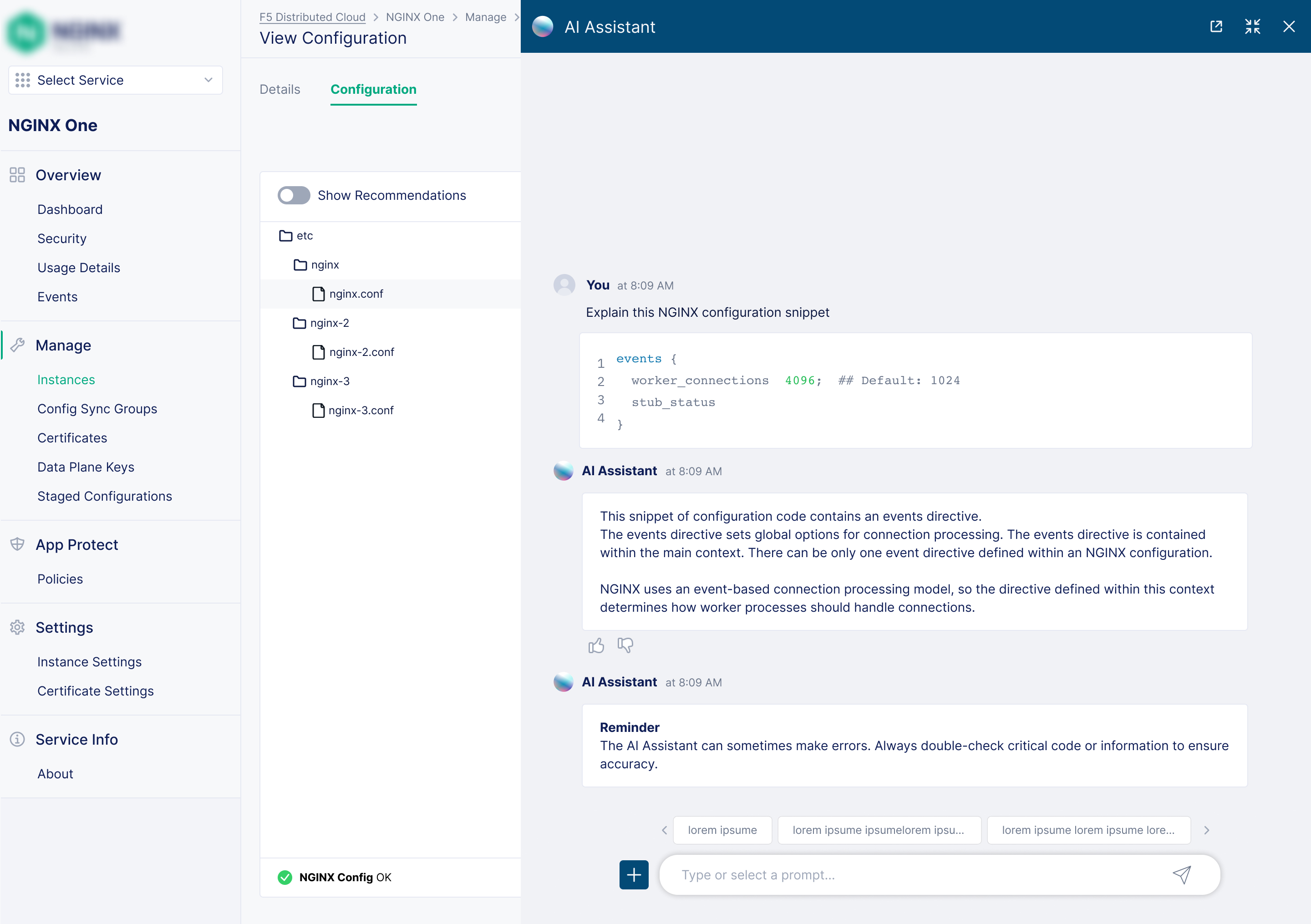
Solution: Rather than simplifying NGINX's complexity away, I designed a layered system that builds user confidence gradually. Each layer adds a safety net: from preventing mistakes in real-time, to explaining code in plain English, to letting users draft changes without risk, to providing a full rollback escape hatch.
Auto-complete + directive tooltips
Real-time suggestions and contextual help for every NGINX directive. Reduces syntax errors before they happen, and surfaces best-practice recommendations inline.
AI Assistant — "Explain with AI"
Select any block of config code and get an explanation in plain English. Chat with the assistant to understand and modify complex configs with confidence, without needing to be an NGINX expert.
Staged Configurations
A draft mode that works like a scratchpad. The staged config doesn't have to be valid; users save in-progress work and push when ready.
Version history + 1-click rollback
A full audit log of every config change. Roll back to recent versions with a single click. It's the ultimate safety net for users who are still building confidence.
Config Sync Groups for Management at Scale
"Pushing the same config change to 80 instances one by one makes scaling a pain"
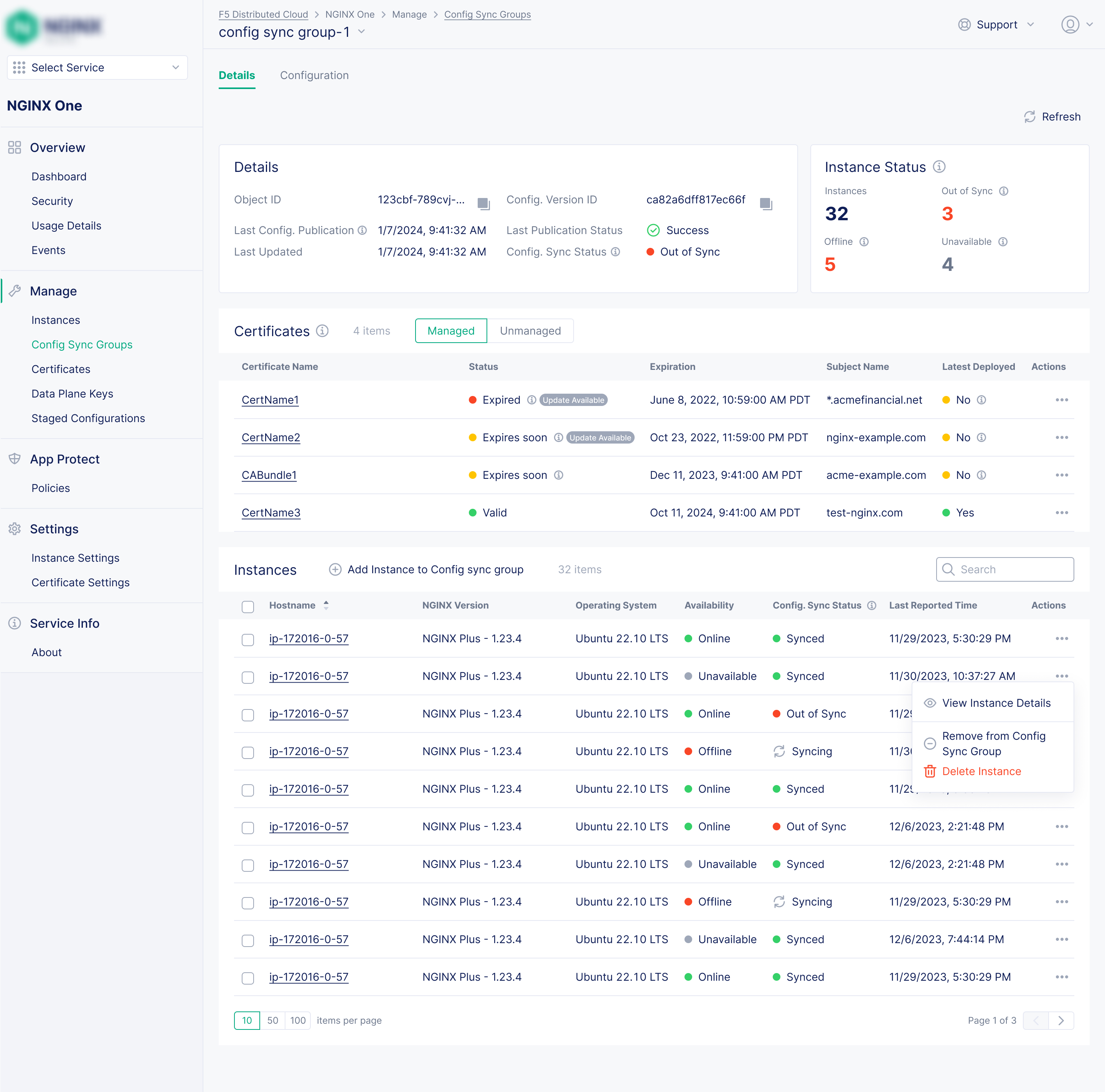
Problem: Ensuring configuration consistency across dozens or hundreds of instances was a constant, manual burden. The prior product, NGINX Instance Manager, had Instance Groups, but its group details page showed little more than the shared config file itself.
Solution: Config Sync Groups let teams group instances logically and push a single configuration to all of them at once. I designed the group details page to go significantly beyond what existed before, giving teams full operational visibility into the group, not just a config view.
One configuration to rule them all
Apply and sync configuration changes to any number of instances simultaneously, replacing a tedious manual process.
Per-instance sync status
The group details page shows each instance's live config matches the group config, with a direct action to re-sync if it doesn't.
Certificate visibility within groups
All certificates referenced in the shared config are listed with expiry status, and flagged when an updated certificate file is available in the console.
Config publication history
See when the group configuration was last published and by whom.
Proactive Certificate Management
"We found out our cert expired when customers started seeing browser warnings."
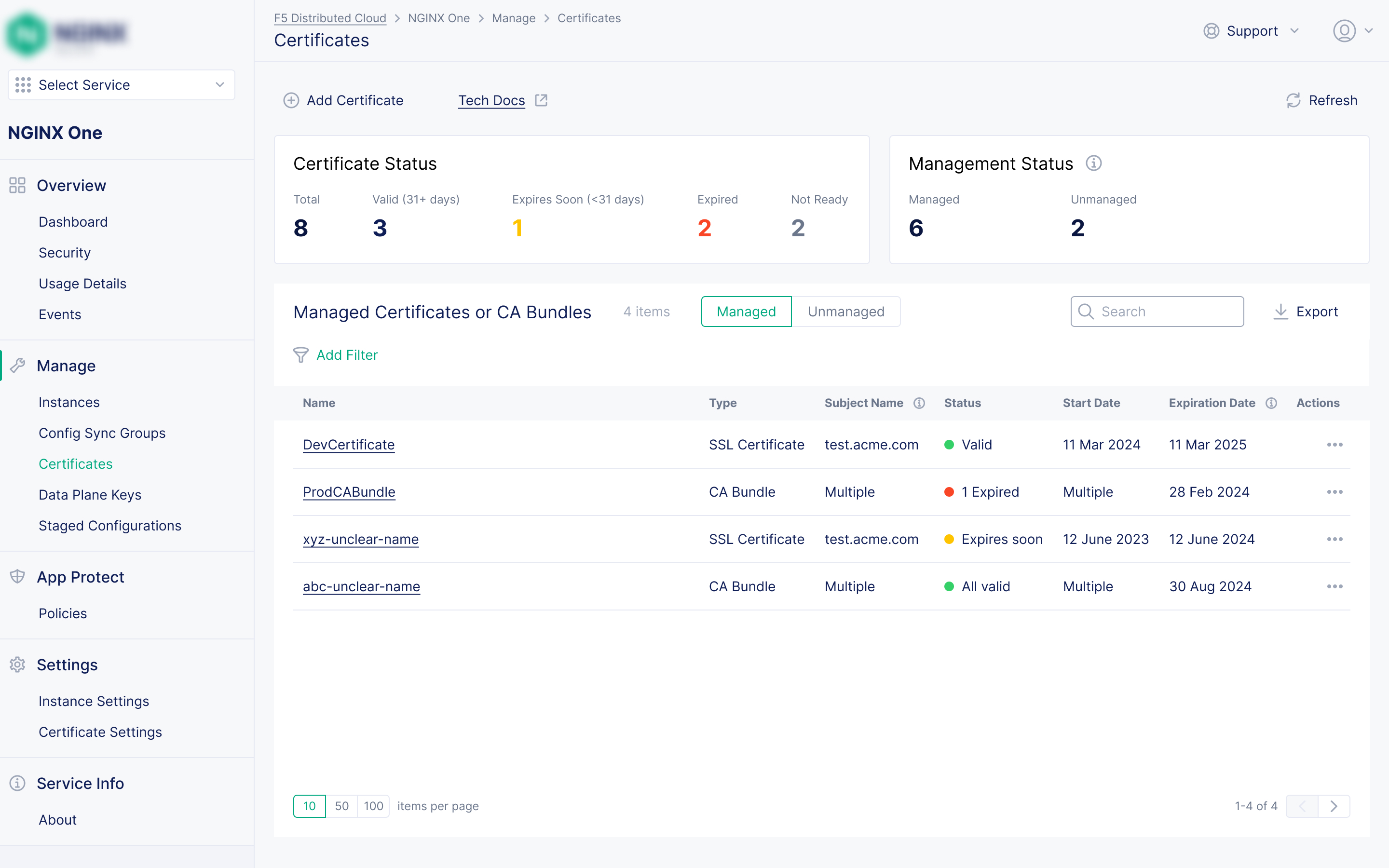
Problem: Manually tracking SSL/TLS certificate expiry across a fleet is tedious. Teams often found out about expired certificates from customers rather than from their own tooling, with the resulting security warnings and service outages.
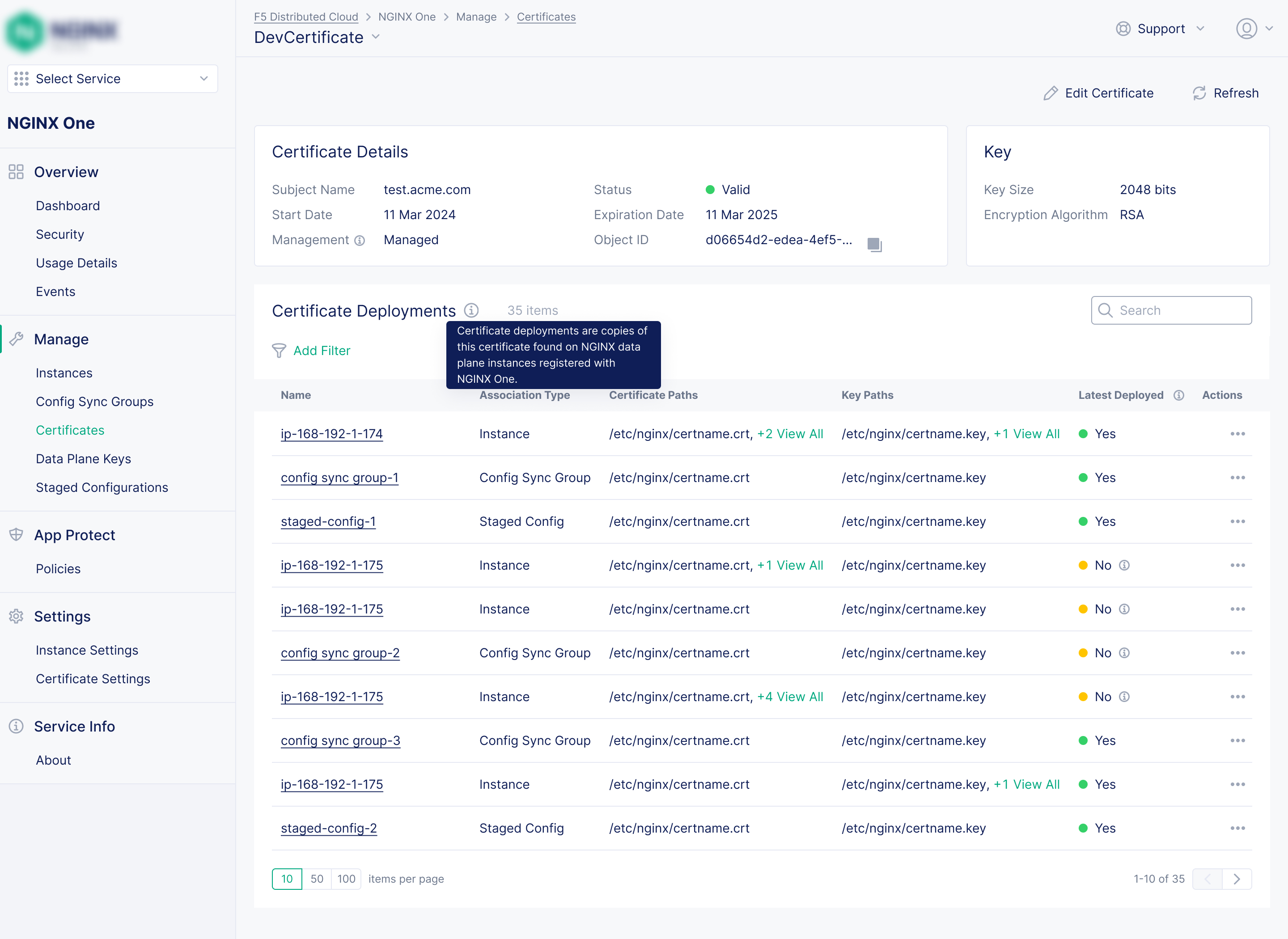
Solution: A centralised certificate inventory giving teams full visibility across every certificate before expiry becomes an incident. My design goal: make certificate expiry feel impossible to miss, not something discovered after the fact.
Centralised inventory
Every certificate in the fleet in one place, with the instances and sync groups each certificate is applied to.
Prominent expiry alerts
Colour-coded warnings for certificates approaching expiry, visible from both the certificate inventory, instance list and the main fleet dashboard.
Group-level tracking
Certificates referenced in a Config Sync Group are tracked and flagged when updated files are available, keeping group configs fully in sync.
Streamlined Security Policy Management
"We have different WAF policy versions running across our fleet and no way to audit which instances have what."
Problem: Applying and auditing NGINX App Protect WAF security policies across a fleet was error-prone when done manually. Policy versions were fragmented, coverage was opaque, and importantly, there was no way to deploy a policy to an instance from the UI in prior products. That last gap was a major omission that I made a priority to fix.
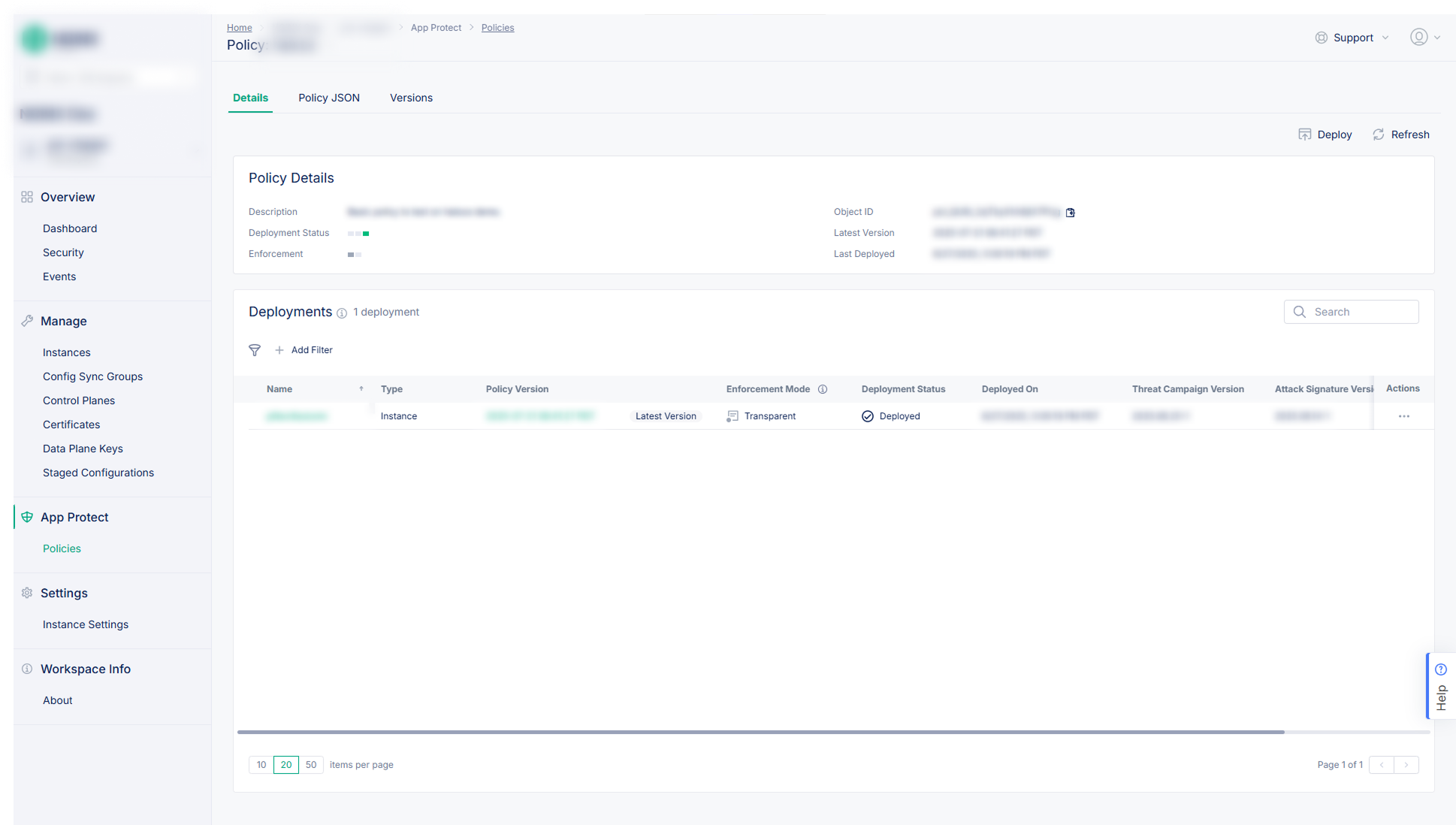
Solution: A version-controlled policy system where SecOps teams can define a policy once and deploy it across any number of instances or groups. I designed a comprehensive wizard for creating and configuring policies, and a multi-step deployment workflow that filled the gap no prior product had addressed.
Version-controlled policies
Each policy has versioned variants with different blocking modes (transparent or blocking). Deploy the right version to the right instances as needed.
Deploy from the UI
A multi-step workflow lets SecOps deploy a policy package to any instance and configure App Protect settings to reference it, the missing workflow from prior products.
Fleet-wide visibility
The policy details view lists every instance the policy is deployed to at a glance.
Powerful Policy creation wizard
I designed a comprehensive wizard for creating and configuring policies, allowing SecOps teams to define parameters like logging preferences, bot detection rules, URI patterns, and more.
in individual contracts directly attributed to the security policy management feature design.
It's launch, along with certificate management and config rollbacks, fulfilled long-standing customer requests and renewed interest from key accounts.
Actionable Security Insights
"We find out we're running a vulnerable version of NGINX from a security blog post, not from our own tooling."
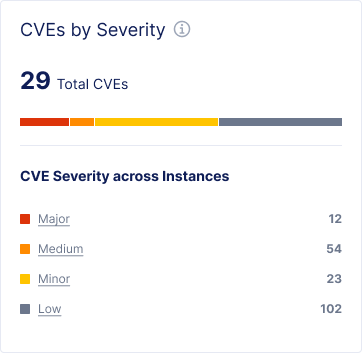
Problem: Without dedicated tooling, identifying which NGINX instances were affected by a newly disclosed CVE (Common Vulnerabilities and Exposures) meant manually cross-referencing version data, which was slow, error-prone, and reactive by nature.
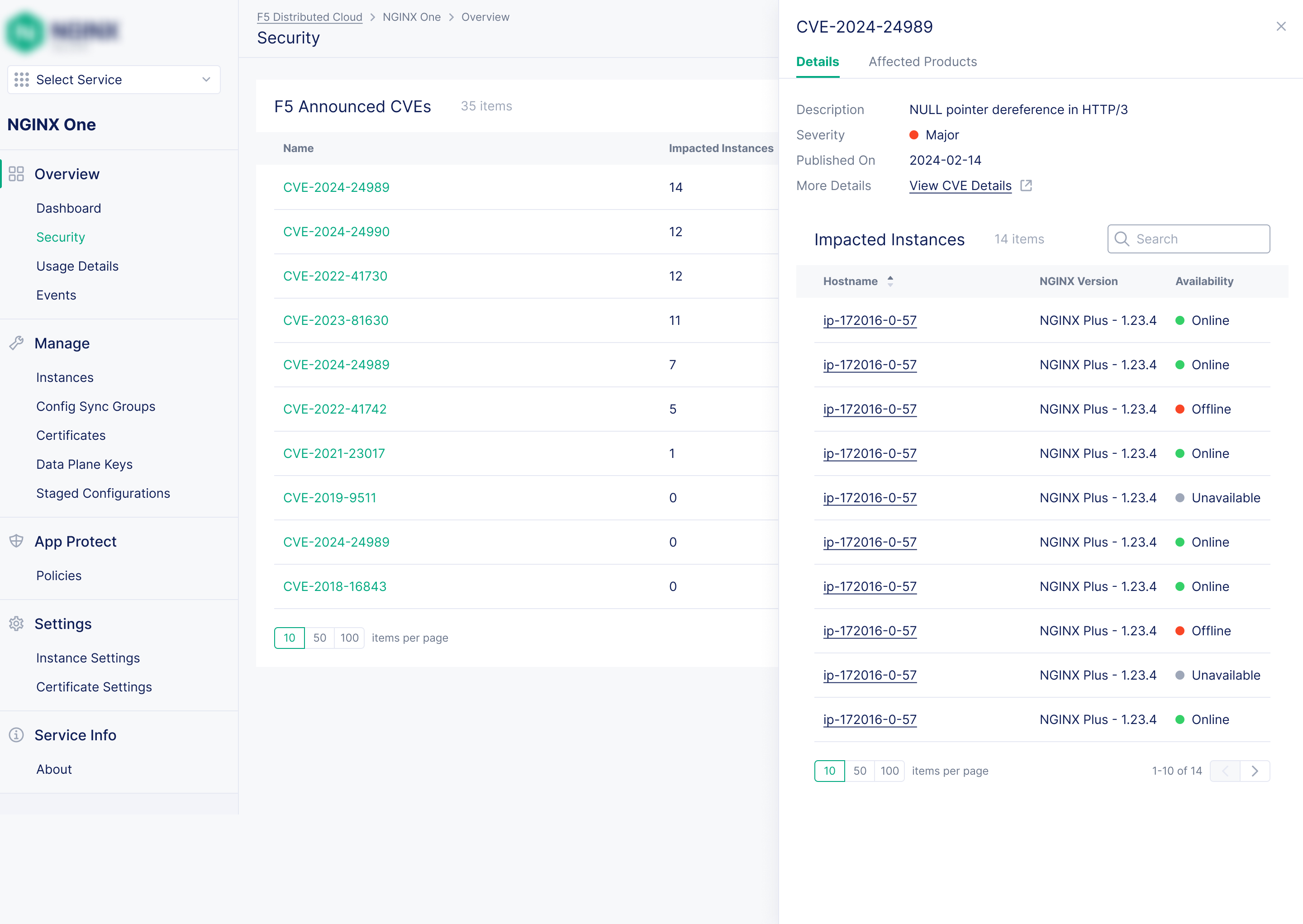
Solution:Automatic fleet-to-CVE correlation that makes vulnerability exposure visible and actionable from the moment a CVE is disclosed, at both the dashboard level and the individual instance level.
Automatic fleet-CVE correlation
Every instance's NGINX version was now continuously cross-referenced against the CVE database removing the need for manual checking.
Dashboard-level exposure summary
The main fleet dashboard surfaces CVE exposure across all instances at a glance: how many are affected and by how many vulnerabilities.
Per-instance CVE detail
Users can drill down to any instance to see its specific CVE exposure, severity levels, and NGINX version.
Kubernetes coverage
CVE tracking extends to NGINX Ingress Controller and NGINX Gateway Fabric deployments: full visibility across containerised workloads.
in individual contracts attributed to specific feature designs
months from blank canvas to MVP at a major industry conference
customer requested major features designed and shipped post-MVP
designer for the entire NGINX product unit, for all products and features
Customer promises kept
The launch of security policy management, certificate management, and configuration rollbacks fulfilled long-standing customer requests that had gone unanswered for a while, directly renewing interest from key accounts.
Business growth driven
NGINX One became a powerful tool for the sales and retention teams. The platform attracted prospective customers, reduced existing customer churn, and strengthened contract renewals.
Design-led culture established
By the end of the project, design had become the central development artifact for the team, mockups drove engineering conversations and were referenced by executives, architects, and PMs. That was a significant cultural shift.
Organisational alignment improved
Close collaboration between design, PM, and engineering reduced rework, improved predictability, and kept the product focused on solving real user problems rather than shipping features for features' sake.
My time on this project was a period of immense professional growth.
Good communication matters.
Working solo across a full product unit taught me that the quality of a design is only part of the story. How clearly you communicate constraints, tradeoffs, and rationale to stakeholders, especially under pressure, is important.
Scope management is crucial.
Without a dedicated design manager, scope decisions fell to me. I learned to push back constructively, set realistic expectations early, and fight for the user problems that mattered most, even when there was pressure to do more with less. Strategically saying "no" is a skill in itself.
Lean on colleagues for help.
Being a solo designer, getting design feedback from other designers across the company's product lines or from UX engineers, or getting input from Customer success engineers was an invaluable resource that helped me design a better product.